


Hybrid Search in Mediafly blends traditional search (metadata + lexical) with AI semantic matching in a single, unified results list to improve relevance and help you find the right content faster.
Note: AI features (including semantic matching and Content Summaries) are part of the AI add‑on and require signing the AI addendum. Contact your Customer Success Manager for enablement details.
How it Works
- Traditional signals (metadata + lexical): Matches your query to titles, descriptions, keywords, tags, and other fields.
- AI semantic signals (vector embeddings): Understands the meaning behind your query to return conceptually related content, even when wording differs.
- Unified ranking: Mediafly integrates both signal types and orders results by overall relevance within a single list, while preserving filtering controls.
Using Hybrid Search
- Enter your query using keywords or phrases.
- Refine with filters to narrow by type, audience, product, lifecycle stage, region, or other configured fields.
-
Review the unified results list: When AI Search is enabled for your organization, semantic relevance is automatically applied and integrated with traditional matches.
(How do I know if it’s enabled in my environment? It’s enabled in your environment if you see a little toggle switch on the top right of the search page that allows users to toggle on and off AI results. - Open an item to view details or take action as needed.
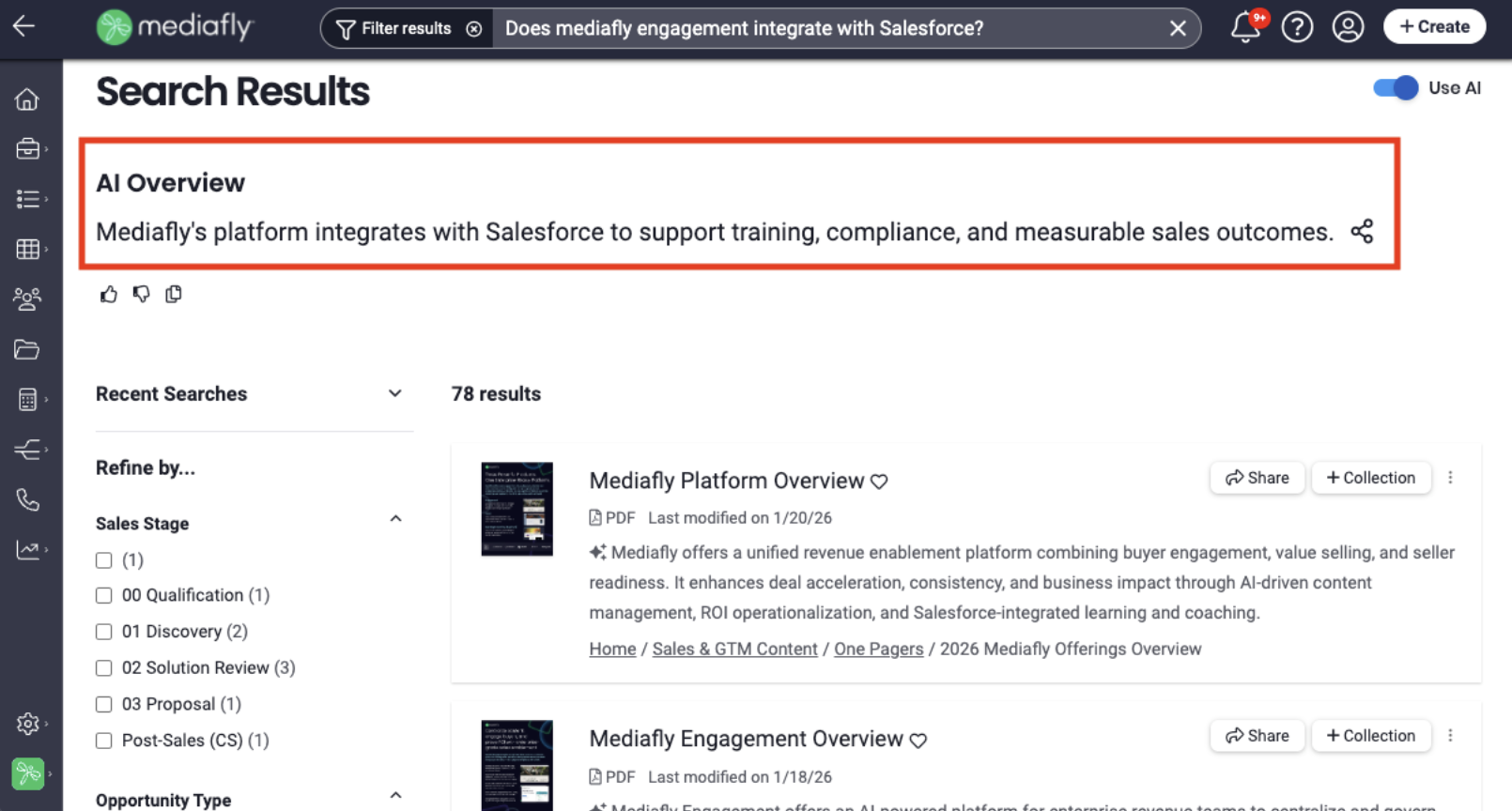
AI Overview
AI Search Overviews give you a short, AI-generated summary at the top of your search results, helping you get the answers faster with fewer clicks. Instead of opening multiple files to piece together information, the AI analyzes the most relevant content in your library and surfaces key insights directly on the search page so you can understand whether the content returned are relevant to what you’re looking for. When you enter a natural language question (for example, “key talking points for our new product launch”), Mediafly analyzes the most relevant content in your library and surfaces:
- A concise overview that highlights the most relevant insights from your content
- Links to the source documents used, so you can click through for full context
- The standard hybrid search results list below the overview for deeper exploration
AI Search Overviews appear at the top of your results when you type a natural language question and Mediafly can confidently summarize an answer for you, instead of just matching an exact file or asset name. For clearly navigational searches (like “Q2 product sell sheets” or “training video for new hires”), you’ll just see the standard results list without an overview.
Content Summaries: Get the Key Takeaways, Instantly
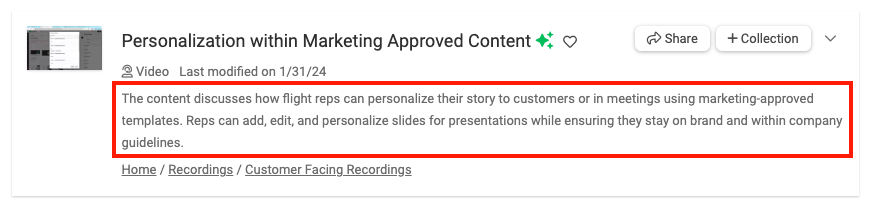
Our new Content Summaries feature provides AI-generated overviews of your key content. Sales reps can quickly grasp essential information without needing to read through long documents. This means:
- Faster Prep Time: Reps can spend less time reading and more time engaging with prospects.
- Improved Conversations: By understanding content faster, reps can deliver more targeted and impactful conversations.
View Content Summaries
In your search results list, each item will have an AI Content Summary listed beneath the item details.
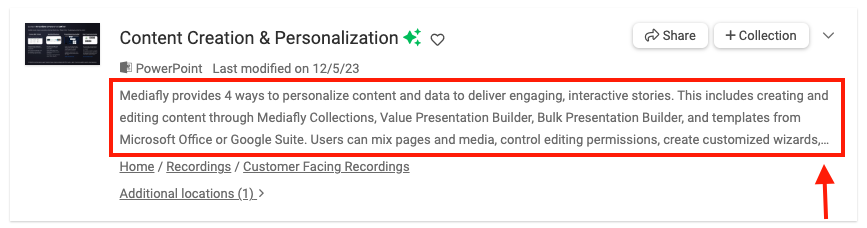
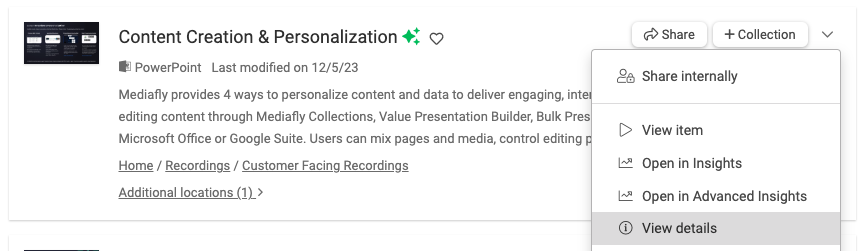
If an item's content summary is longer than the dedicated space, you'll see it ending in an elipsis (...). To view the entire summary, click the dropdown caret and click "View Details". The item information will expand and you'll be able to review the entire summary.

Best practices for better findability
- Populate metadata thoroughly: Titles, descriptions, keywords, tags, and structured fields should clearly reflect the asset’s purpose, audience, and product lines.
- Use consistent naming conventions: Clear, standardized titles and tags improve matching and sorting.
- Curate common terms and synonyms: Include product nicknames, campaign aliases, and regional terms in keywords/metadata.
- Leverage filters: Narrow by content type, persona, stage, or region to quickly focus results.
Replies have been locked on this page!