


First, open your Salesforce integration settings:
• Mediafly (Advanced Insights) users: Go to Administrative Settings > Report Management > All Integrations > select Salesforce > Connection Settings tab
• Revenue Intelligence only only users: Go to Settings > All Integrations > select Salesforce > Connection Settings tabIn another window, go to https://login.salesforce.com/
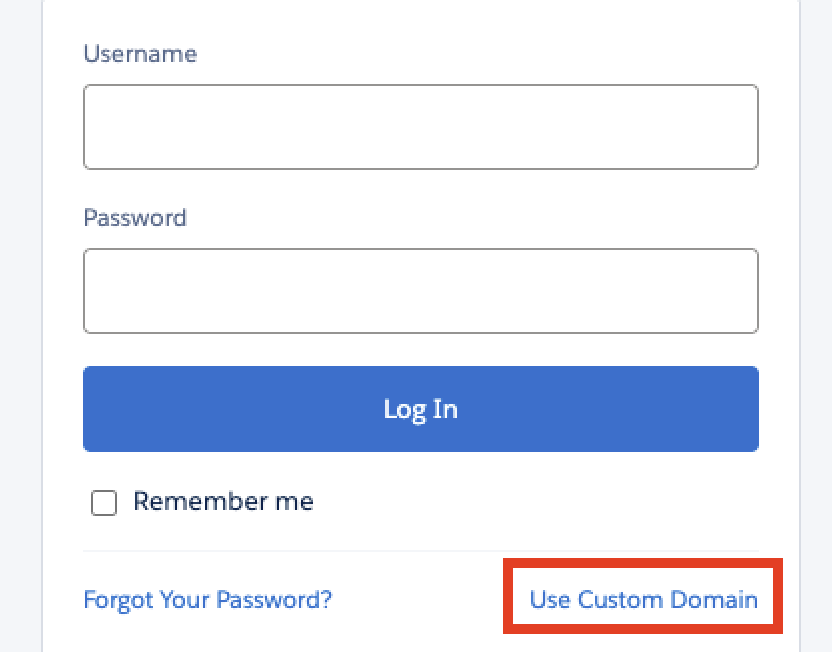
At the bottom of the login card, click Use Custom Domain
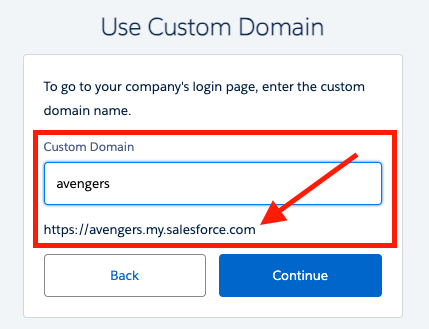
Start adding your custom domain like you were logging into the sandbox, then copy the domain you see just below the text box
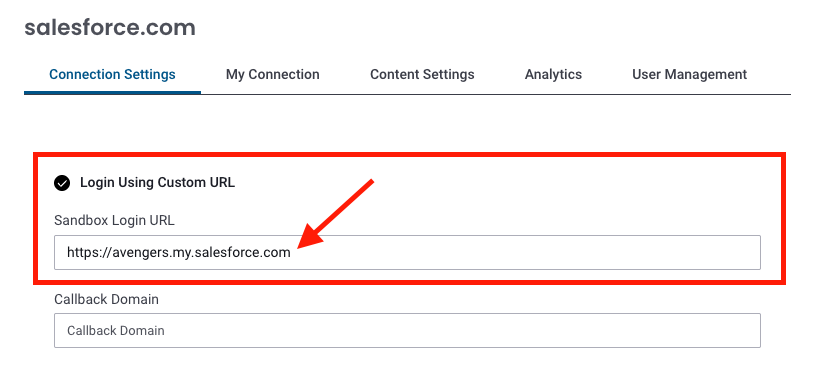
Return to the window with your open Salesforce integration and paste that URL into Sandbox Login URL. Make sure that Login Using Custom URL is checked.
Note: If you don't see the option to Login Using Custom URL, expand the advanced menu.-
Next steps will depend on if your org has already enabled the integration:
▪ If your org is already enabled the integration: click Save and you're done!
▪ If your org hasn't: click here and continue with the integration steps.
Replies have been locked on this page!