


Action Plan templates help your team start from a proven structure instead of rebuilding the same Action Plan for every deal. Once a template is set up, it becomes the default Action Plan for newly created Digital Sales Rooms in your environment, giving sellers a faster, more consistent starting point while still allowing them to tailor the plan for each opportunity.
Creating an Action Plan Template (Admin Only)
- Go to Settings > Digital Sales Room Settings
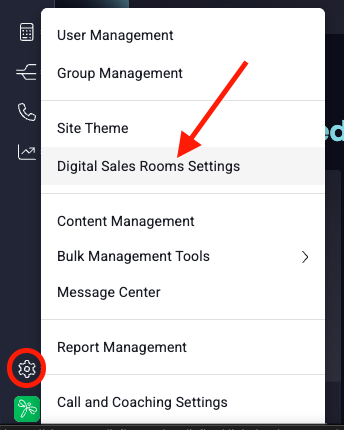
- Click on the Action Plan Template tab
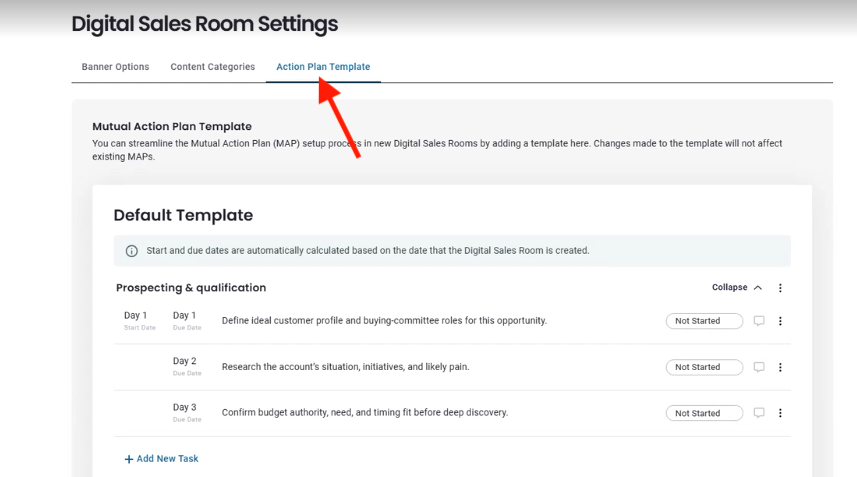
- Add tasks & sections just as instructed in Action Plans & DSRs (screenshot)
- Click Save
This Action Plan Template will now be the default Action Plan in newly created Digital Sales Rooms in your environment. Your reps will be able to adjust the template to best fit their needs in each particular DSR. Reps can still delete the template elements and choose to build Action Plans from scratch if the template is not the right fit for a particular deal, but enabling your reps by setting up the template is the fastest way to get to a complete, standardized plan.
Best Practices for Creating Action Plan Templates
A strong Action Plan template should help sellers start faster, stay consistent, and make only the changes that matter for the deal in front of them.
Build for the most common use case
Create a template that works for the majority of deals, not every possible scenario. This matters because one solid default is more useful than a template that feels bloated or overly specialized.
Use real milestones and clear tasks
Base the template on the steps your team actually follows. Write tasks that are specific and easy to understand. This matters because vague or generic tasks create more cleanup work for sellers and make the template less useful.
Keep it simple
Keep it simple and avoid over-customizing by using a small number of clear, reusable sections and only including tasks needed in most deals, rather than building the template around one account, one rep, or an unusual process; this makes the template easier to scan, adjust, and adopt, and it is always easier for sellers to delete unnecessary sections than to create new ones from scratch.
Leave room for sellers to tailor the plan
The template should provide a strong starting structure, not a finished plan. This matters because sellers can customize the applied Action Plan for the deal without changing the source template.
Timeframes
The template allows you to (optionally) set a range of days where certain tasks should be completed, starting from the day that the DSR is created. This helps encourage timely completion of tasks. However, if standard timeframes are unknown, avoid being too prescriptive or reps may end up spending extra time adjusting start and due dates.
Use dependencies carefully
Only add dependencies when task order truly matters. This matters because too many dependencies can make the plan feel rigid and harder to work with.
Remember that template updates are not retroactive
When you update the template, those changes do not apply to Action Plans that already exist. This matters because you should review and improve the template early, knowing changes will only help future plans.
Review regularly and refine based on usage
Stay tuned in to feedback from DSR users: Pay attention to whether sellers are using the template, deleting the same sections, or rebuilding major parts manually. This matters because those patterns show where the template can be simplified or improved.
Pro tip: Review the template regularly, more often at first, then every 3–6 months, to keep it aligned with how your team works.
What good looks like
A strong template should provide these benefits:
- Sellers: Save time
- Sellers: Reduce repetitive setup / update work
- Sellers: Provide flexibility when the customer needs it
- Sales Ops / Leaders: Encourage a consistent process for deal progression
- Sales Leaders: Help managers coach from a common structure
If your template does those things, it is doing its job.
Replies have been locked on this page!