


Prerequisites
- Your Mediafly tool is built with Value, not as a custom tool.
- You must be an Administrator to be able to edit the Lead Capture form.
- You must have sufficient rights within Marketo.
- Your Marketo form must not have Progressive Profiling.
Create the form in Marketo
- Go to Design Studio > Forms, and create your form
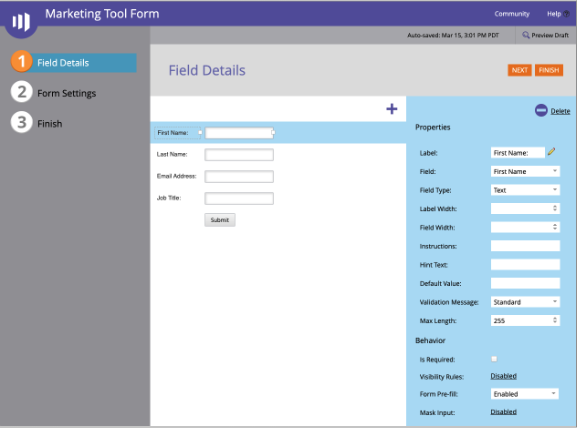
- Be sure to add in the fields that are relevant for your use case. A sample form may look like this:
Finish and Approve the form
-
You will need to collect several pieces of data to connect your ValueStory Marketing Tool to this form.
- First, you will need information about your Marketo instance and your form. When viewing the details of your form, go to Form Actions > Embed Code. This will show you a dialog like this:
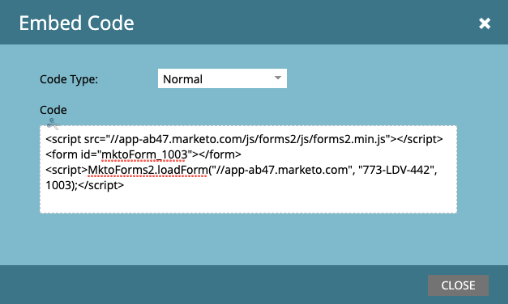
The values you need are:
- Base URL. This is the main part of the URL of your Marketo instance, including the //. In the example, it is //app-ab47.marketo.com
- Munchkin ID (or, Munchkin Account ID): In the example, it is 773-LDV-442. You can also find this in Admin > Integration > Munchkin
- Form ID: The ID for this form. In the example, it is 1003
- Next, you will need the IDs of the specific fields themselves. Go to Admin > Database Management > Field Management. Then, for each of the fields in your form:
- Search for the field name in the right hand side list, and select it
In the center panel, look for API Name. An example might be FirstName or Email. You will use API Name later, when connecting your Tool Builder form fields to Marketo fields
Configure the Marketo form within your template
- Open your template and navigate to the hamburger (3-line) menu, and tap on Administration
- Within the Administration dialog, tap on Template Library. Find the template against which you want to connect to your lead generation form. Tap on it, and choose the Lead Capture Form action > Create Form (or, if it has already been created, Edit Form)
- Set the Title and Description of the form. On Display on page, pick where in the flow the lead capture form should appear
- Under Form Status, choose either Enabled or Disabled
- Switch to Platform Setup and choose Marketo
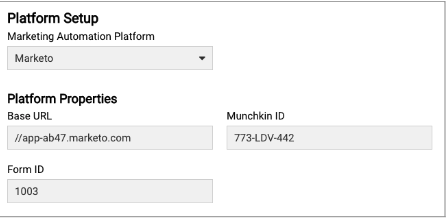
- Enter the Base URL, Munchkin ID, and Form ID. It may look something like this:
-
Switch to the Fields page and enter each User Field (e.g. email address, name)
- Label: what you want the field to say in your ValueStory tool
- MAP Field ID: the API Name of the field that you pulled from Database > Field Management in Marketo above. E.g. FirstName or Email
- Create the field, and tap on the Field Type. Fill out the Field Properties, as follows:
- Tap Save and Close, and your form is ready
Replies have been locked on this page!