


When you combine Value selling tools with the versatile reporting tools of Intelligence, you get Advanced Insights—a much clearer picture of how to improve your value selling strategy through usage, effectiveness, and seller engagement analytics tied to business outcomes. It helps you see how each Value tool is being used, when it’s most effective, and which sellers are engaging with it, alongside metrics like deal health, win/loss and conversion rates, sales cycle, and rep performance.
Intelligence provides out-of-the-box (OOTB) value analysis via the Value Insights Dashboard so you can hit the ground running with pre-configured, commonly needed reports and dashboards—and still adjust them to fit your specific needs. You can also build your own reports from scratch for complete flexibility.
This article breaks down the types of Value data you can report on in Intelligence. For a ready-to-use dashboard, see the Value Insights Dashboard to explore what’s available OOTB. If you’re interested in leveraging Advanced Insights, please contact your CSM.
Note: Before you can start inspecting your Value reports, ensure your admin has Setup the Value Integration.
Jump to:
What types of Value data can I report on in Intelligence?
The categories below use the OOTB card names from the Value360 Insights Dashboard and can be customized or combined on dashboards in Intelligence.
-
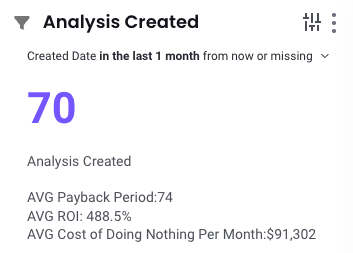
Analyses Created: Tracks the number of analyses created within a selected date range to identify trends; often reviewed alongside headline metrics like average payback period, average ROI, and average cost of doing nothing per month.
-
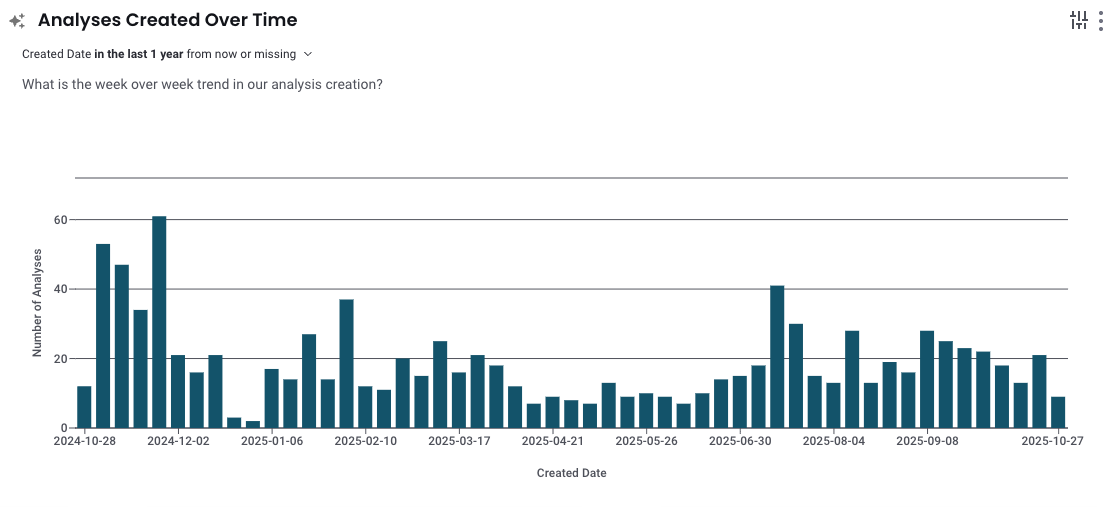
Analysis Created Over Time: Displays weekly creation trends (e.g., this fiscal quarter) to spot seasonal patterns or enablement impacts.
-
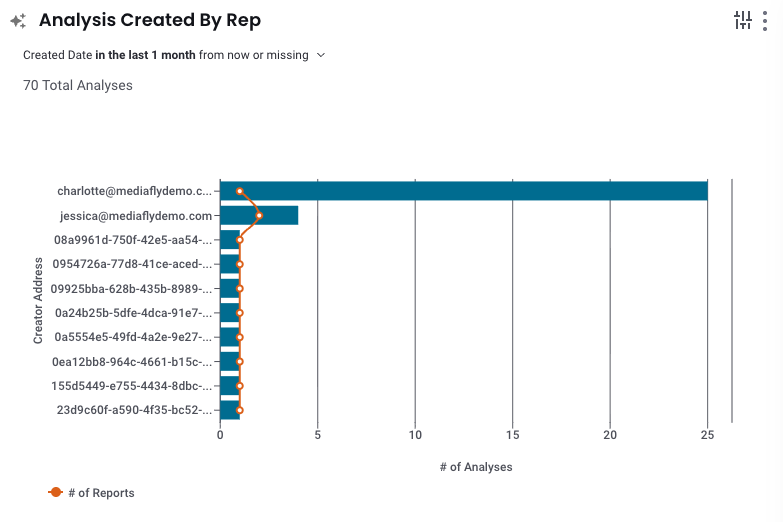
Analysis Created by Rep: Highlights which team members are actively creating analyses to surface top performers and coaching opportunities.
-
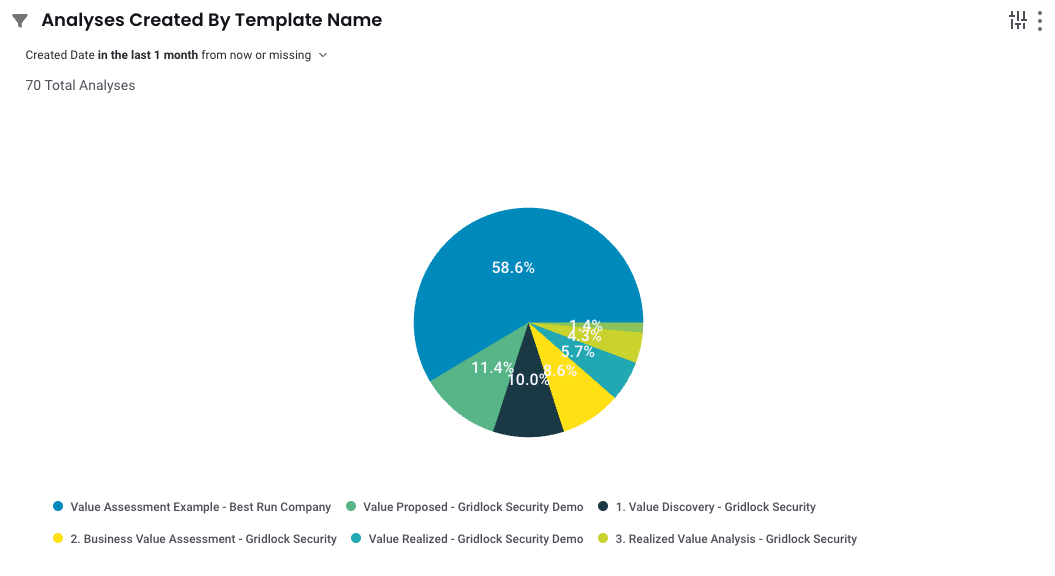
Analysis Created by Template Name: If you use multiple templates, see which are most frequently used and preferred by the field; remove if you don’t use multiple templates.
-
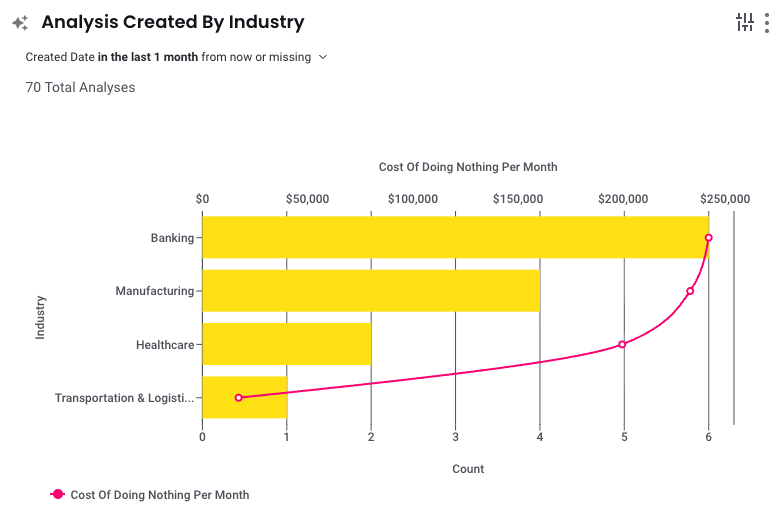
Analyses Created by Industry: Shows which industries are actively utilizing the tool and helps you identify cross-industry trends.
-
Average Customer ROI by Industry: Displays the average modeled ROI per industry to validate assumptions and standardize messaging; you can also adapt your reporting to headline or chart other outcomes like Average Payback Period if desired.
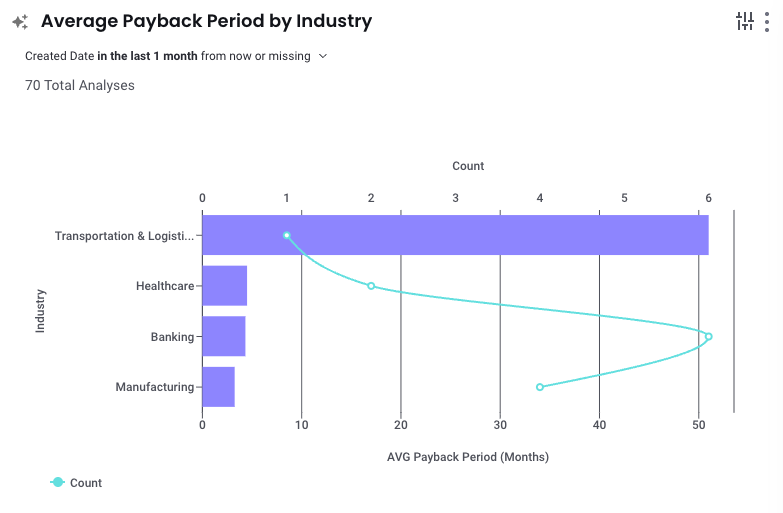
Note: You can still incorporate additional headline-style cards such as Analysis Created or summary metrics (e.g., Average Payback Period) in custom dashboards or reports as needed.
Out-of-the-box Value reports and dashboards (OOTB)
To accelerate time-to-insight, Intelligence includes the Value Insights Dashboard, which monitors tool adoption, measures engagement, and surfaces actionable insights to refine your Value selling strategy. Use it immediately, then tailor the filters, segments, and cards to your organization’s needs.
If your Value environment has a CRM integration (e.g., Salesforce), you can enable additional reporting such as “Win Rate by Value Tool Usage.” For help enabling or tailoring CRM-based views, connect with your CSM.
Reading Intelligence reports (how to explore and interact)
Each report presents a visualization (e.g., headline, bar, pie) with a detailed data table below for inspection and export. You can:
- Hover on chart elements to see itemized values in context.
- Click chart elements to filter the chart and the data table below to that selection; multi-select via the legend is supported.
- Search table data, export results, and rearrange/resize/sort columns to analyze precisely what you need.
- Check out Interactive Cards to learn more about navigating the report cards.
More Intelligence Reporting Resources
Creating / Editing Reports (Admin Only): Learn more about creating net new reports or adjust existing reports to best fit your needs
All Reports Page: Search & manage existing reports
Note: These resources support the entire Intelligence Platform, some features may not be applicable to the Value/Intelligence integration.
Replies have been locked on this page!